Portfolio Website Pipeline
A fully automated static-site deployment workflow for this website using GitHub Actions and Pages.
Source: nightclucker/portfolio_website
Overview | Tech Stack | Intended Workflow | Implementation | Issues Faced | Takeaway
Overview
This project showcases a complete CI/CD pipeline using Hugo for static-site generation and GitHub Actions for automated builds and deployments. The goal was a fast, reliable, zero-touch deployment process with the goal of making it effortless to update this portfolio site and confident that every change builds cleanly and ships quickly.
Problem Statement
How can I put together a website that will also show off my Build Engineering and DevOps skills?
Tech Stack
Here’s a list of tools and technologies that was used in the construction of this pipeline.
| Category | Technology/Tool |
|---|---|
| CI/CD | GitHub Actions |
| Source Control | Git, GitHub |
| IDE | VS Code |
| Language | YAML, HTML, Markdown |
| Website Hosting | GitHub Pages, Porkbun |
| AI | Co-Pilot |
| Other | Hugo, Affinity Canva |
Intended Workflow
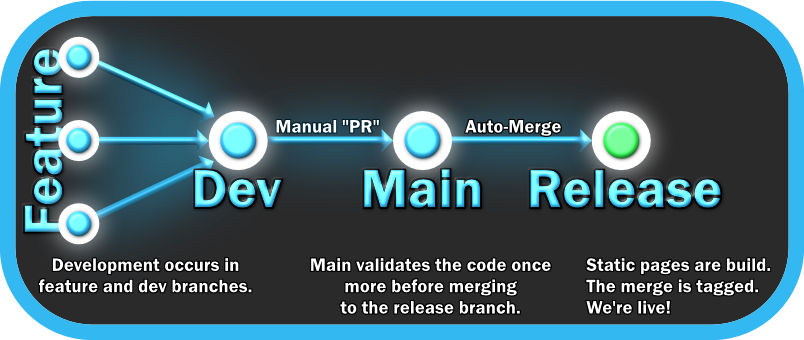
Feature branches feed into dev, dev stabilizes into main, and main then merges into the release branch.
Steps:
Development — It is desired for development of features to be done in the short-lived feature and dev branches. Though, for small fixes and changes it is acceptable to make the changes in the main branch. No changes are expected to be committed directly to the release branch.
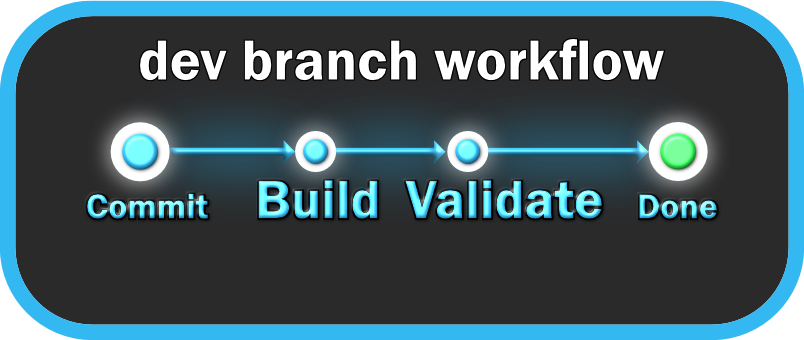
Validation — On every check-in the the project is built and validated and errors are reported back in GitHub as well as in email.
- Build the site - if the build fails, nothing else runs.
- runs: hugo –minify –destination public
- Link Markdown - Validate the markdown formatting. Reports back if any errors are found. The .markdownlint.json file is used to configure the command.
- runs: markdownlint “content/**/.md*
- Spell check - Checks the spelling the markdown files using cspell. The cspell.json file is used to configure the command with words to ignore.
- runs: cspell “content/**/.md”*
- HTML and link validation - Checks the generated HTML files for problems—broken links, missing alt text, invalid markup, bad scripts, etc.
- runs: htmlproofer public –ignore-urls “/localhost/,/127.0.0.1/” –allow-missing-href
- Build the site - if the build fails, nothing else runs.
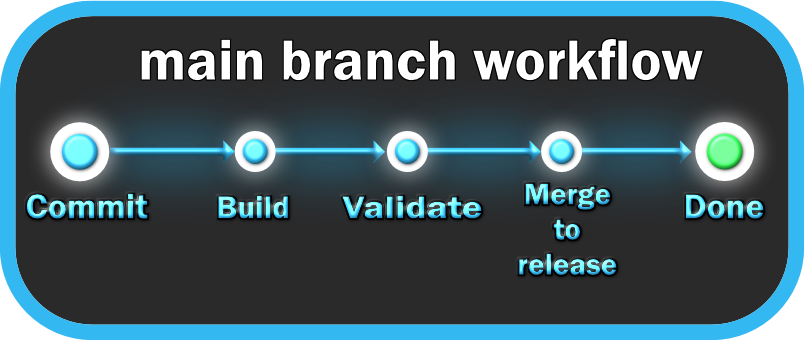
Merging to Main — After a pull request is accepted into main the site will be built and validated again. Once it has passed that then it will be auto-merged into release.
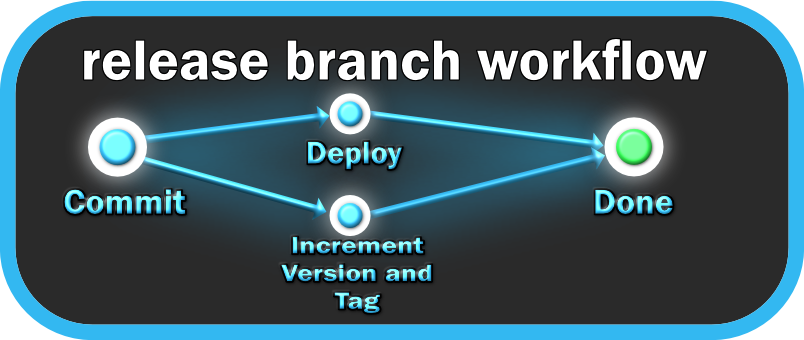
Release — When changes are merged in from the main branch the static website will be generated using Hugo and pushed to GitHub Pages. The branch will also be tagged with a new version number. example: v1.1, v1.2, etc.
Implementation
I started by registering a domain through Porkbun and wiring up DNS records to point to GitHub Pages. From there I stood up the repository, picked Hugo after evaluating a few static site generators (it had the strongest theme ecosystem), and used Copilot to help scaffold the initial layout. Once the core site was running, I layered in the CI pipeline: Hugo builds, markdown linting with markdownlint, spell checking via cspell, and full HTML/link validation with htmlproofer. The final piece was automating promotion from main to release, which required a Personal Access Token to work around GitHub’s recursive trigger protection.
If you are curious, here are the steps and stages I went through to get this site ready.
- Research into how to host a website through GitHub.
- Registered a URL using Porkbun. It appears to be nicely priced and easy to use.
- Create a GitHub repository nightclucker/portfolio_website
- Set up DNS records in Porkbun to point to the GitHub pages IPs.
- Research into static website generators. Picked Hugo as they had a lot of interesting themes.
- Research into how to use Hugo and the theme. Used co-pilot to assist me in figuring out certain things.
- Had Co-pilot boilerplate the site for me.
- Hooked up the hugo workspace in GitHub. Now when I submit it will now deploy to GitHub Pages.
- Cleaned up and adjusted the site.
- Created my own banner and other images and applied them to the site
- With the assistance of Co-pilot, set up a workspace that builds and validates the generated pages.
- Configure markdown linting and cspell check.
- Created new About Me page.
- Research in how a projects page should appear.
- Begin work on projects page.
- Updated the validates workspace to merge into release from main.
- Added dev branch.
- Updated the validates workspace to not merge to release if the workflow is not being run from main.
- Fixes and changes made to the rest of the pages.
Issues Faced
This may be a simple project but I did face a few issues and bugs that I had to figure out.
Builds stopped deploying after changing the “on push” setting in the hugo.toml from main to release.
- Reason: GitHub prevents this from working properly so to prevent recursive triggers.
- Fix: Created a Personal Access Token, set that as a secret value, then call that in the validate.yml workspace as the first step in the stage to promote to release.
External link validation failing on LinkedIn urls.
- Reason: LinkedIn prevents bots from accessing their site.
- Fix: Added the LinkedIn url to the ignore url list.
Missed a lot of random small spelling mistakes that were thankfully caught by the pipeline.
- Reason: VS Code doesn’t have spell check on by default.
- Fix: Enable the spell check extension.
Theme can be difficult to work with when attempting to do more specialized things.
- Reason: Not as experienced with using themes and static page generators. I was attempting to fight against the stream. Once I was able to figure out how to use what’s here it became easier.
- Fix: Learned how to use themes. Using AI to help set up more difficult layouts.
Takeaway
This project was straightforward in scope but intentionally challenging in practice as it involved several tools I had little or no prior experience with, including GitHub Actions, GitHub Pages, and Hugo. I also made a deliberate effort to minimize AI assistance and work through problems myself, which led to a much deeper understanding of how these pieces fit together. The issues I ran into reinforced why automated validation matters: the pipeline caught spelling mistakes and broken links that manual review would have missed.