Perforce New Project Setup Script Part 1
A Bash script that bootstraps a new Perforce project by automating depot creation, stream setup, group management, and permissions.
Source: nightclucker/dev-tools/new-p4-project-setup.sh
Overview | Tech Stack | Intended Workflow | Implementation | Issues Faced | Next Steps
Overview
This project is a Bash script (new-p4-project-setup.sh) that automates the end-to-end bootstrapping of a new Perforce (P4) stream depot. Rather than walking an admin through a series of manual P4 admin steps, the script creates the depot, all required mainline and release streams, a project group containing the specified users, and the permission entry that grants that group access all in a single command. The script is idempotent, so re-running it is safe; any resource that already exists is simply skipped.
Goal
Reduce the manual, error-prone process of setting up a new Perforce project for a game or software studio. Developers, artists, and producers should be able to request a new project and have a correctly configured depot with a full stream hierarchy and group permissions ready without requiring deep Perforce administration knowledge.
Tech Stack
Here’s a list of tools and technologies that was used in the construction of this script.
| Category | Technology/Tool |
|---|---|
| Language | Bash |
| Source Control | Git, GitHub |
| IDE | VS Code |
| Version Control (target) | Perforce Helix Core (P4) |
Intended Workflow
An admin with Perforce super-user privileges runs the script once per new project, supplying the project name and a comma-separated list of P4 usernames. The script handles the rest.
This is intended to be runnable on Linux and Mac machines.
Steps:
- Validate Environment — The script confirms that the Perforce CLI (
p4) is installed and on thePATH, that there is an activep4 loginsession, and that the logged-in user is a member of theSupergroup. If any check fails the script exits with an error before making any changes. - Create Depot — A stream depot named after the project is created. If the depot already exists this step is skipped.
- Create Mainline Streams — Three mainline streams are created under a
devsub-path:Main,ArtSource, andTools. These are the primary integration targets for code, art content, and shared tooling respectively. - Create Release Streams — Three release streams are created under a
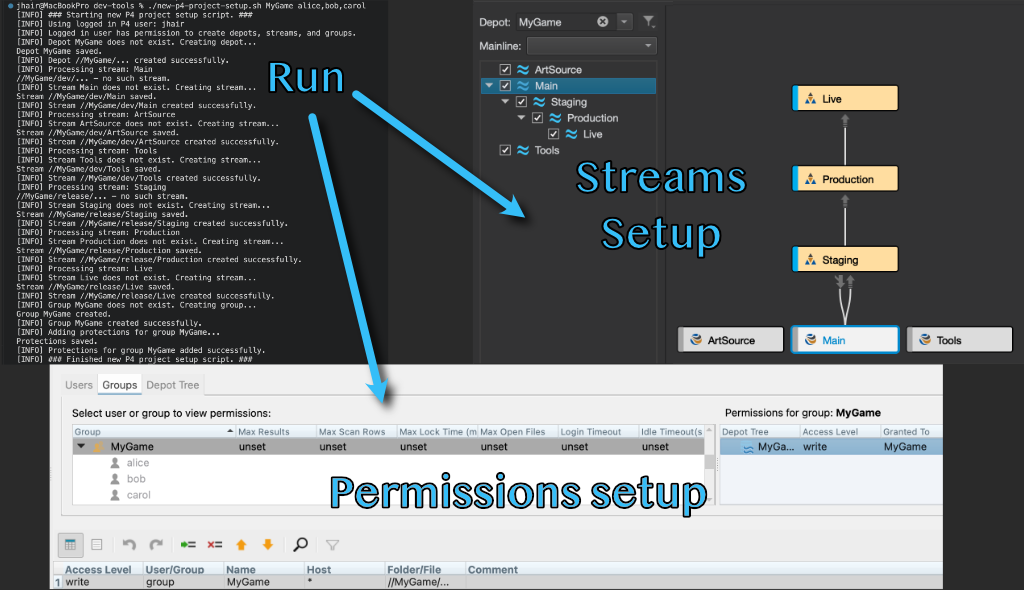
releasesub-path:Staging,Production, andLive. These are parented offMainand configured so that changes cannot be merged back down to the parent (except fromStaging, which retains that ability to stay in sync withMain). - Create Project Group — A P4 group named after the project is created and populated with the provided users. The first user in the list is treated as the project owner.
- Set Permissions — A
writeprotection entry granting the new group access to the entire project depot (//<project_name>/...) is inserted at the top of the P4 protections table. Placement at the top is intentional because Perforce evaluates protections in order.
Usage:
./new-p4-project-setup.sh <project_name> <project_users>
Example:
./new-p4-project-setup.sh MyGame alice,bob,carol
This creates the MyGame depot, all mainline and release streams, a MyGame group with alice, bob, and carol as members (owned by alice), and grants that group write access to //MyGame/....
Progress and errors are logged to both stdout and the system log via logger under the tag p4-project-setup.
Implementation
The script is structured around a set of discrete, single-responsibility functions that mirror the steps above. Each function performs its own idempotency check before issuing any P4 commands, querying the server to see if the resource already exists and skipping creation if it does.
Stream specs are built using a template string with {{{PLACEHOLDER}}} tokens that are substituted via Bash parameter expansion before being piped into p4 stream -i. This made it straightforward to reuse the same template across all six streams while varying the type, parent, and options per stream. Release streams required special handling: the notoparent option is set on all release streams except Staging (the first in the chain), which retains toparent so it can stay synchronized with Main.
Permission management works by writing the current protections table out to a temporary file, checking whether the new entry is already present, and if not, using awk to insert it immediately after the Protections: header line. The modified file is then fed back into p4 protect -i. Temporary files are cleaned up on exit.
Permissions are added to the top of the p4 protect Protections: table as the order for that table matters. Bottom entries go last and are usually reserved for groups that lose or gain all access depending on the situation.
Issues Faced
Release stream parent chaining was not straightforward.
- The script creates release streams in sequence (
Staging→Production→Live), with each stream parented off the previous one. Getting thenotoparentoption right for each position in the chain — while keepingStagingable to merge back toMain— required careful logic to track which stream is the base parent versus a downstream release stream.
- The script creates release streams in sequence (
P4 protections table ordering matters.
- Perforce evaluates protection entries top-to-bottom and stops at the first match. Appending the new entry at the bottom could cause it to be shadowed by more general rules already in the table. The script inserts the entry at the top of the
Protections:section usingawkto guarantee it takes effect.
- Perforce evaluates protection entries top-to-bottom and stops at the first match. Appending the new entry at the bottom could cause it to be shadowed by more general rules already in the table. The script inserts the entry at the top of the
Spec formatting sensitivity.
- Perforce CLI specs passed via
p4 ... -iare tab-sensitive in certain fields (e.g.MaxResults,Users). Getting the heredoc formatting right for the group spec required careful attention to whitespace to avoid parse errors.
- Perforce CLI specs passed via
Next Steps
The script covers the core setup steps needed to get a project running. Future improvements could include:
- Adding files, such as Jenkinsfiles, used by the various pipelines to the streams after they are created.
- Adding a
--dry-runflag that prints what would be created without making any changes. - Supporting a configuration file input instead of positional arguments, to make it easier to define projects with many users or non-default stream layouts.
- Extending the stream hierarchy to include per-developer task streams created automatically for each user in the group.