Perforce New Project Setup Script Part 2: Building the Same Tool with Claude
A design-doc-driven rebuild of the Perforce project setup script, this time with Claude doing the planning and implementation.
Source: nightclucker/dev-tools/p4-project-bootstrap.sh
Overview | Tech Stack | Intended Workflow | Implementation | Issues Faced | Next Steps
Overview
This is a follow-up to Perforce New Project Setup Script Part 1, where I hand-wrote a Bash script to set up a new Perforce (P4) project. For this part, I wanted to see how Claude would approach the exact same problem starting only from a short design document, without looking at the script I had already written.
Goal
Write up a design doc for the same P4 project set up tool, then hand it to Claude in plan mode and let it design and implement the script on its own. The doc intentionally included a couple of small inaccuracies to see whether Claude would notice and ask about them rather than guess and run with it.
Tech Stack
Here’s a list of tools and technologies that was used in the construction of this script.
| Category | Technology/Tool |
|---|---|
| Language | Bash |
| Source Control | Git, GitHub |
| IDE | VS Code |
| Version Control (target) | Perforce Helix Core (P4) |
| AI | Claude Code |
Intended Workflow
The idea was to treat Claude like a developer picking up a design doc cold: write the spec, hand it over in plan mode, answer whatever questions come back, and only then let it write code.
Steps:
- Write the Design Doc — I wrote
p4-setup-script-design.md, listing the objective, final product, main features, and a “Nice to haves” list, plus an explicit instruction not to reference the script from Part 1. I left a couple of things ambiguous on purpose: a typo’d stream name (ArtToolsinstead ofArtSource) and a vague “Production or Release” naming choice for the release flow. - Run Claude in Plan Mode — I pointed Claude Code at the design doc and asked it to read it over and put together an implementation plan before writing any code.
- Answer Questions — Claude flagged both ambiguities instead of guessing, and asked which name to use for the second mainline stream and the third release stream. It also asked how much latitude it had on the “Nice to haves” list, which I left to its judgment.
- Save the Plan — Once the design was settled, I had Claude write the plan out to
p4-project-bootstrap-plan.mdso there was a record of the structure, idempotency approach, and which nice-to-haves it intended to include before any code got written. - Implement the Script — Claude worked through the saved plan and produced
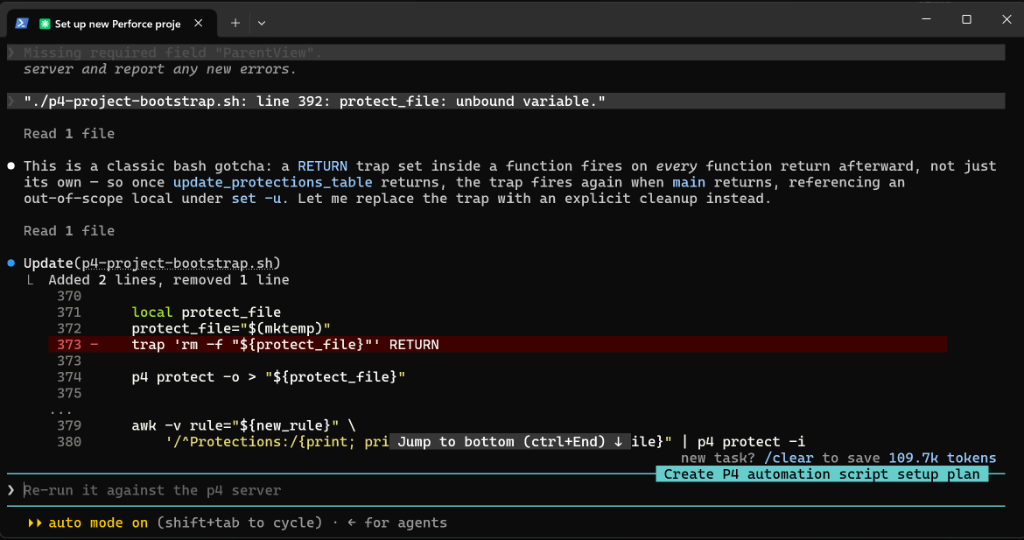
p4-project-bootstrap.sh. - Fix Bugs — A couple of issues surfaced once I actually ran the script against a P4 sandbox. I had Claude fix them directly rather than patching them by hand as it was the one that broke it.
Usage:
./p4-project-bootstrap.sh [-n|--dry-run] <project_name> <project_users>
Example:
./p4-project-bootstrap.sh MyGame alice,bob,carol
This creates the MyGame depot, all mainline and release streams, a MyGame group with alice, bob, and carol as members (owned by alice), and grants that group write access to //MyGame/....
Progress and errors are logged to both stdout and the system log via logger under the tag p4-project-bootstrap.
Implementation
Functionally, the script Claude produced lands in the same place as Part 1: a depot, six streams split into dev and release categories, a group, and a protections entry, with the same idempotent, safe-to-rerun behavior. From the “Nice to haves” list in the design doc, it chose to build a dry-run mode, logic to add missing users to the group on a re-run, and a creation timestamp and description written into every spec — all relatively cheap additions given the “keep it simple” instruction in the doc. It deliberately left out the heavier items like a Docker image, email notifications, and per-stream README files, reasoning that they needed infrastructure the repo didn’t have.
Where it diverges from my version is in how it’s built. Instead of writing a reusable stream creation function, Claude generalized them into create_mainline_stream() and create_release_stream() functions parameterized by name, parent, and a merge-down flag which means that it called these functions six times. I don’t know if my way is correct but it took in a list of streams which then I looped over to make them.
Planning: Claudes Plan
Issues Faced
Design doc ambiguities were caught instead of guessed.
- The typo’d
ArtToolsstream name and the “Production or Release” naming choice were exactly the kind of thing I expected Claude to either silently pick one for or hallucinate past. Instead, both were surfaced as questions during plan mode before any code was written, which is what made me comfortable letting it proceed unsupervised from there.
- The typo’d
The generated script had a couple of bugs on the first real run.
- Running it against a live P4 sandbox surfaced a couple of issues that hadn’t shown up during planning. I had Claude fix them directly rather than digging in myself, which worked, but it meant I couldn’t be fully sure the fix addressed the root cause versus just the symptom I reported.
The result is more complex than what I would have written by hand.
- The generic helper functions and extra flags make the script more capable, but they also raise the bar for another engineer to jump in and extend or debug it compared to the more linear, repetitive version from Part 1.
- The shell script uses more advanced methods that a less experienced person would have a hard time figuring out.
Next Steps
- Revisit the deferred “Nice to haves” (Docker packaging, email/message notification, per-stream README files) now that there’s a working baseline to build on.
- Keep using the design doc → plan mode → implementation workflow for future scripts, since it did what I wanted: catch bad or ambiguous input before it turned into bad code.
- Create a subagent that is focused on scripting and/or Perforce usage to make these kind of tools.
- Give the script a different name than “bootstrapping” as we can expand past the bootstrapping aspect.